Congratulations on unboxing your shiny new Samsung Galaxy S25 Edge! No matter if you’re a long-time Galaxy fan or just starting your journey with Samsung, there’s one important buddy you definitely want to have by your side: the instruction manual. This handy guide will help you master every feature, shortcut, and hidden gem your device has to offer! Let’s take a look at how you can easily find the official Samsung Galaxy S25 Edge instruction manual.
How to download the Galaxy S25 Edge instruction manual
To find the Samsung Galaxy S25 Edge instruction manual and fully understand how to operate your device and access its features, there are several straightforward and reliable methods you can use.
Official Samsung Support website
The most authoritative source for the Galaxy S25 Edge manual is Samsung’s official support page.
Simply visit the Samsung Support website, navigate to the “Manuals & Downloads” section, and enter your device model (such as SM-S937) in the search bar.
You will find a downloadable PDF version of the user manual that covers everything from basic setup to advanced features like camera settings, battery optimization, and One UI customization.
Direct access to your device via the Samsung Members App
The Galaxy S25 Edge comes pre-installed with the Samsung Members app, which includes a support section containing the user manual.
Open the app, go to the “Support” tab, and search for the manual. This allows you to download and view the manual offline on your phone, making it convenient to reference anytime without needing internet access.
Trusted third-party websites
Several reputable sites offer free downloads of the official Samsung Galaxy S25 Edge user manual in PDF format, such as galaxys25edgemanual.com.
These versions are typically the same as the official manuals and provide detailed instructions about device layout, functions, troubleshooting, and feature usage.
What you will learn from the manual
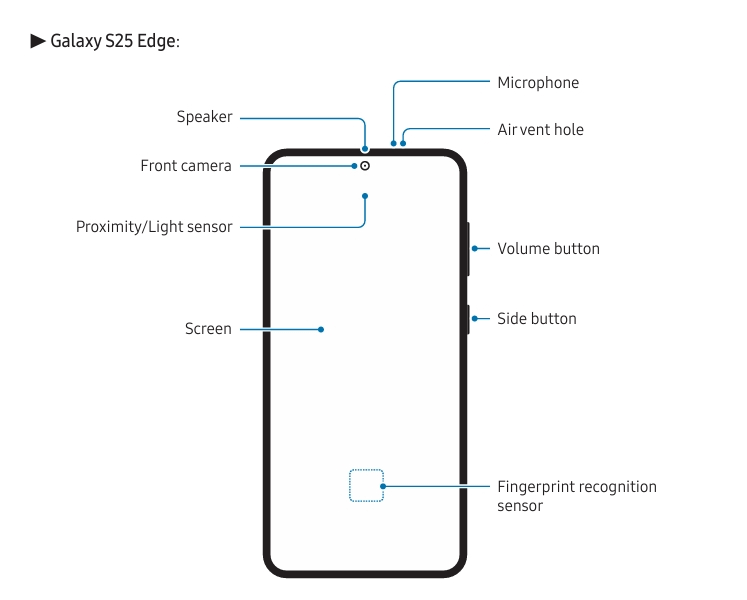
The Samsung Galaxy S25 Edge manual is a comprehensive resource that helps you:
- Set up your device, including SIM card installation and initial configurations.
- Understand the hardware and software layout, including buttons and navigation.
- Use advanced features like fast charging, multi-window, Game Booster, and camera modes.
- Customize your phone’s interface with wallpapers, widgets, and Always On Display.
- Manage connectivity options such as Wi-Fi, Bluetooth, and mobile hotspot.
- Troubleshoot common issues like battery drain, connectivity problems, and app management.
- Transfer data from old devices and manage your Samsung account securely.
You can’t get the most out of your Samsung Galaxy S25 Edge unless you have the user manual handy.
This manual will help you get from confused to confident, no matter how much you know about Samsung. The instructions are clear and easy to follow.
You can read or download the official Samsung manual on the company’s website. It is a really useful tool that will help you get the most out of your phone. It will show you how to use every feature, fix frequent problems, and make it fit your needs perfectly.
Put this priceless resource to work for you and take your Galaxy S25 Edge experience to the next level.